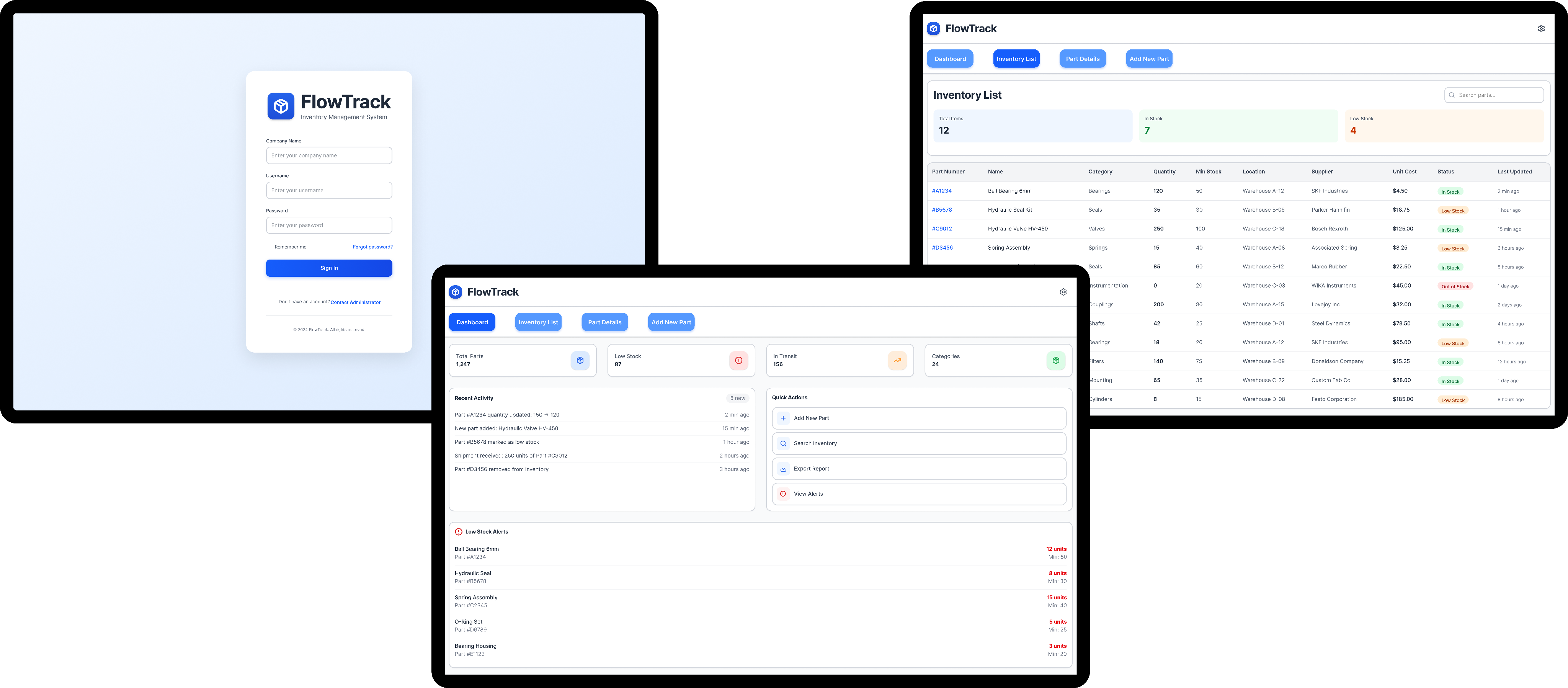
A tablet first internal logistics application designed to help industrial workers track materials, and complete work orders in real time.
Call out a feature, benefit, or value of your site, then link to a page where people can learn more about it.
Context
Industrial and shipyard logistics teams rely heavily on legacy desktop systems that were never designed for tablet use or on-the-floor workflows. Workers are expected to update task status, and follow detailed work instructions while navigating large facilities and wearing personal protective equipment (PPE).
Problem
This mismatch between tools and environment leads to delays, incomplete reporting, and limited visibility into operational progress.
Desktop-first tools in a
tablet environment
Existing systems were difficult to use on tablets, with small touch targets and dense layouts unsuited for field work.
Complex, multi-step work orders
Tasks often require strict sequencing and compliance checks, but instructions were difficult to follow in real time.
Limited real-time visibility
for supervisors
Progress updates and issue reporting were delayed or inconsistent, making it hard to manage resources effectively.
Solution
From research, I defined four primary design goals:
Reduce cognitive load during task execution
Design for physical constraints, not ideal conditions
Support complex workflows without overwhelming users
Create a scalable, maintainable design system
Who I was Designing for...
Warehouse Worker
Works on the floor, moves constantly.
Needs simple, rapid interactions.
Frustrated by excessive typing.
Uses a tablet with gloves and protective gear.

How can we implement these into the design?
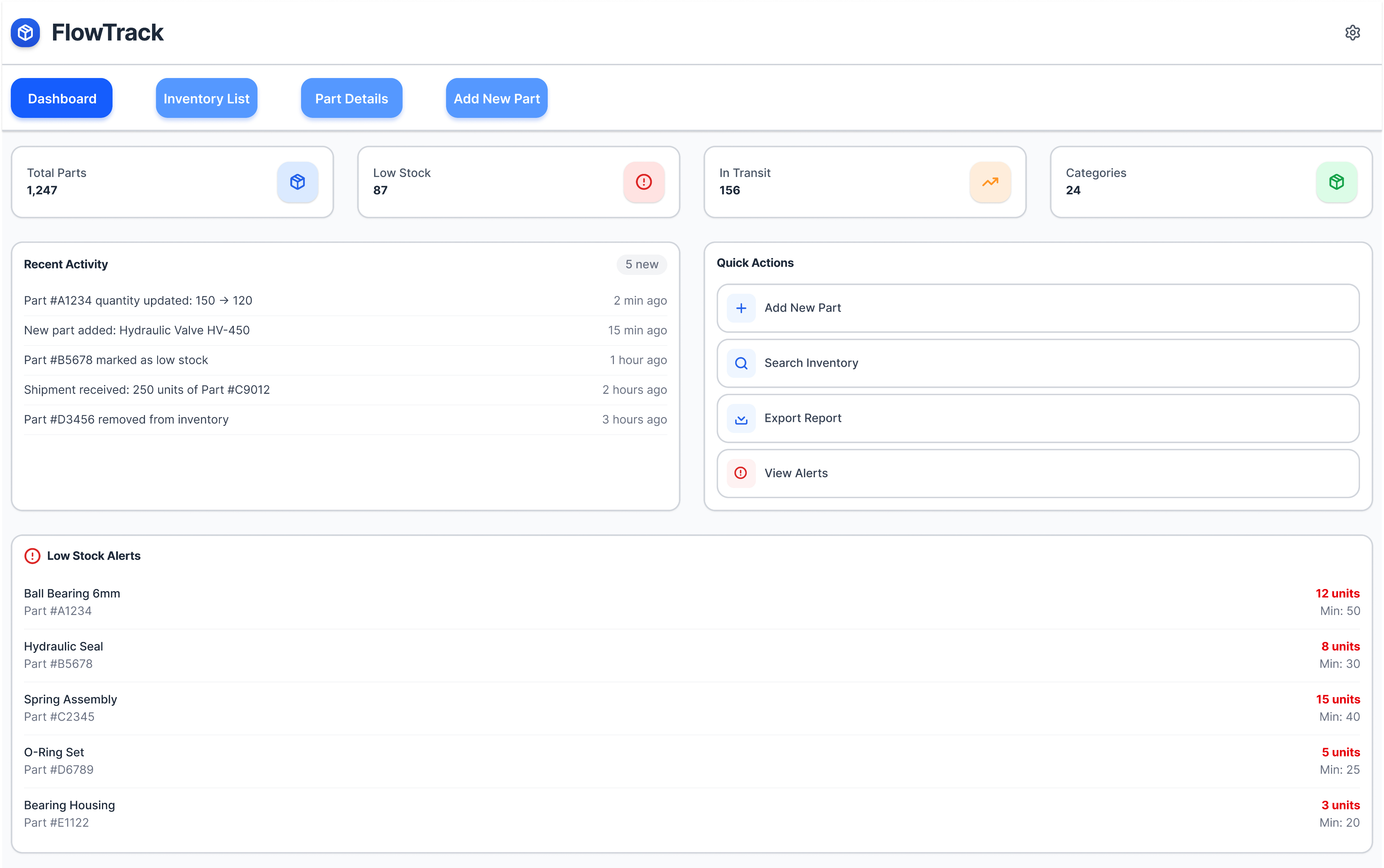
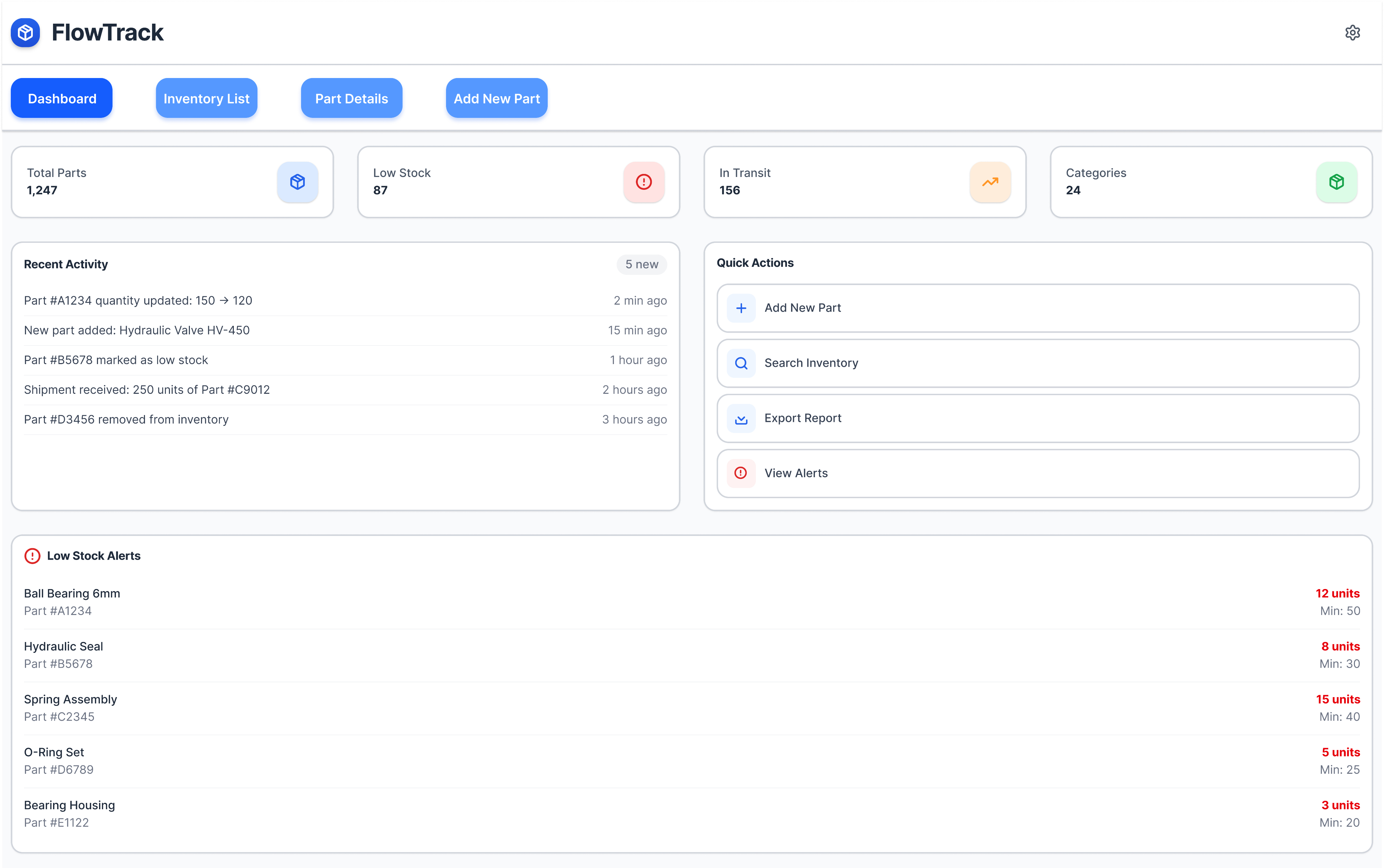
A dashboard with quick actions.
The user can see everything at a glance. All with large touch targets making it easy to use in busy enviornments.
Inventory List.
The user can view what is in stock, and requires to move parts to different warehouses.
Part Description.
The user can see descriptions of an individual part and order more if stock is running low.
Add a part to the companies system.
This text field allows the user to put in a new part by filling out the form.
Outcome and reflections
FlowTrack demonstrates how enterprise tools can be reimagined for real-world environments:
• Simplified complex workflows into manageable steps
• Improved task visibility and reporting accuracy
• Created a tablet-first experience suited to physical, industrial contexts
• Established a scalable foundation supported by a design system
This project reinforced the importance of designing for actual working conditions, not ideal ones. By prioritizing clarity, physical usability, and system thinking, FlowTrack balances user needs with organizational requirements—an approach I continue to apply in enterprise and operational UX projects.
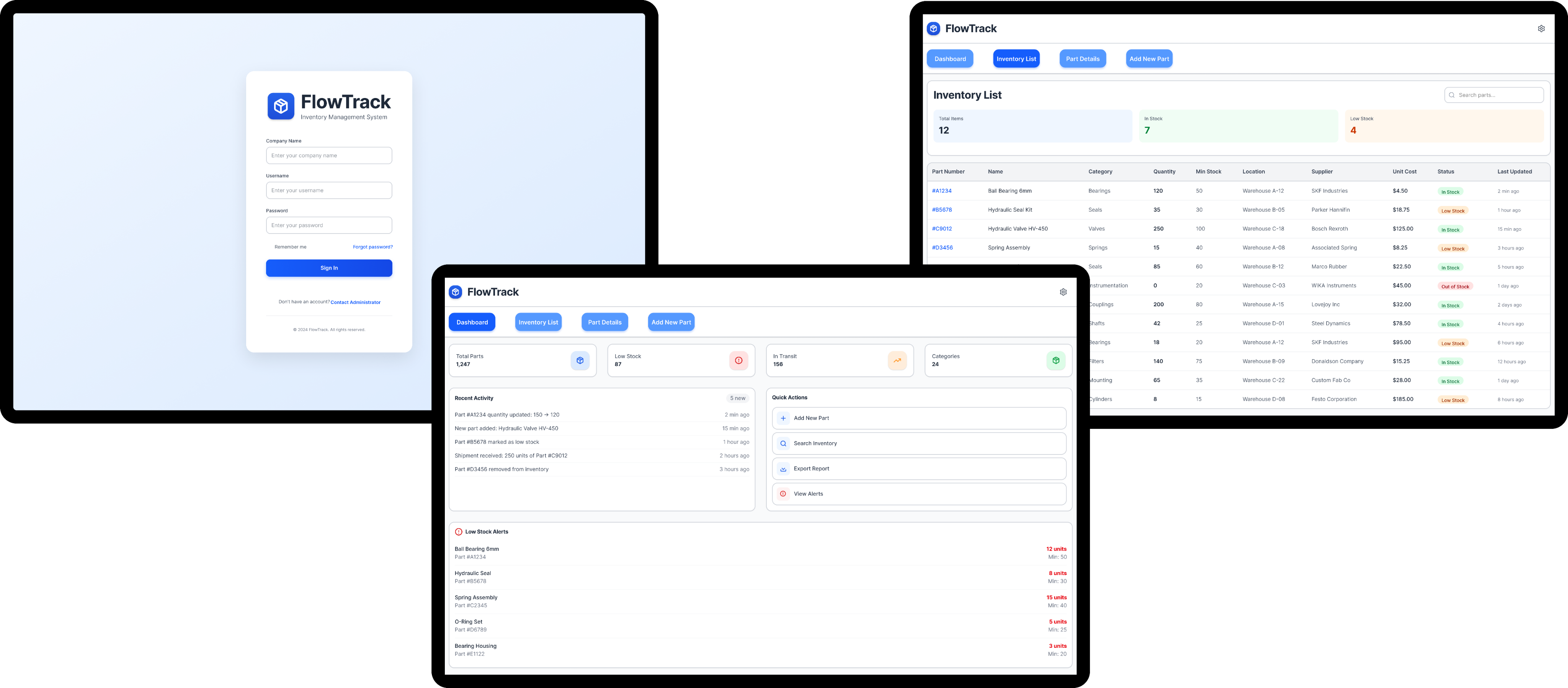
A tablet first internal logistics application designed to help industrial workers track materials, and complete work orders in real time.
Call out a feature, benefit, or value of your site, then link to a page where people can learn more about it.
Context
Industrial and shipyard logistics teams rely heavily on legacy desktop systems that were never designed for tablet use or on-the-floor workflows. Workers are expected to update task status, and follow detailed work instructions while navigating large facilities and wearing personal protective equipment (PPE).
Problem
This mismatch between tools and environment leads to delays, incomplete reporting, and limited visibility into operational progress.
Desktop-first tools in a tablet environment
Existing systems were difficult to use on tablets, with small touch targets and dense layouts unsuited for field work.
Complex, multi-step work orders
Tasks often require strict sequencing and compliance checks, but instructions were difficult to follow in real time.
Limited real-time visibility for supervisors
Progress updates and issue reporting were delayed or inconsistent, making it hard to manage resources effectively.
Solution
From research, I defined four primary design goals:
Reduce cognitive load during task execution
Design for physical constraints, not ideal conditions
Support complex workflows without overwhelming users
Create a scalable, maintainable design system
Who I was Designing for...
Warehouse Worker
Works on the floor, moves constantly.
Needs simple, rapid interactions.
Frustrated by excessive typing.
Uses a tablet with gloves and protective gear.
How can we implement these into the design?
A dashboard with quick actions.
The user can see everything at a glance. All with large touch targets making it easy to use in busy enviornments.
Inventory List.
The user can view what is in stock, and requires to move parts to different warehouses.
Part Description.
The user can see descriptions of an individual part and order more if stock is running low.
Add a part to the companies system.
This text field allows the user to put in a new part by filling out the form.
Outcome and Reflections
FlowTrack demonstrates how enterprise tools can be reimagined for real-world environments:
• Simplified complex workflows into manageable steps
• Improved task visibility and reporting accuracy
• Created a tablet-first experience suited to physical, industrial contexts
• Established a scalable foundation supported by a design system
This project reinforced the importance of designing for actual working conditions, not ideal ones. By prioritizing clarity, physical usability, and system thinking, FlowTrack balances user needs with organizational requirements—an approach I continue to apply in enterprise and operational UX projects.
A tablet first internal logistics application designed to help industrial workers track materials, and complete work orders in real time.
The project focused on simplifying complex workflows, improving visibility for supervisors, and ensuring the experience met organizational and accessibility standards in demanding field environments.
Context
Industrial and shipyard logistics teams rely heavily on legacy desktop systems that were never designed for tablet use or on-the-floor workflows. Workers are expected to update task status, and follow detailed work instructions while navigating large facilities and wearing personal protective equipment (PPE).
Problem
This mismatch between tools and environment leads to delays, incomplete reporting, and limited visibility into operational progress.
Desktop-first tools in a tablet environment
Existing systems were difficult to use on tablets, with small touch targets and dense layouts unsuited for field work.
Complex, multi-step work orders
Tasks often require strict sequencing and compliance checks, but instructions were difficult to follow in real time.
Limited real-time visibility for supervisors
Progress updates and issue reporting were delayed or inconsistent, making it hard to manage resources effectively.
Solution
From research, I defined four primary design goals:
Reduce cognitive load during
task execution
Design for physical constraints, not
deal conditions
Support complex workflows without overwhelming users
Create a scalable, maintainable
design system
Who I was Designing for...
Warehouse Worker
Works on the floor, moves constantly.
Needs simple, rapid interactions.
Frustrated by excessive typing.
Uses a tablet with gloves and protective gear.
How can we implement these into the design?
A dashboard with quick actions.
The user can see everything at a glance. All with large touch targets making it easy to use in busy environments.
Inventory List.
The user can view what is in stock, and requires to move parts to different warehouses.
Part description.
The user can see descriptions of an individual part and order more if stock is running low.
Add a part to the companies system.
This text field allows the user to put in a new part by filling out the form.
Outcome and Reflections
FlowTrack demonstrates how enterprise tools can be reimagined for real-world environments:
• Simplified complex workflows into manageable steps
• Improved task visibility and reporting accuracy
• Created a tablet-first experience suited to physical, industrial contexts
• Established a scalable foundation supported by a design system
This project reinforced the importance of designing for actual working conditions, not ideal ones. By prioritizing clarity, physical usability, and system thinking, FlowTrack balances user needs with organizational requirements—an approach I continue to apply in enterprise and operational UX projects.